How Computer-Aided Writing Changed from Word Processing to AI
Computer-aided writing moved from word processing to generative AI. Learn how each shift changed drafting, revision, and the choices writers must make.
Computer-aided writing changed a writer’s day before a machine could suggest a sentence. A word processor made text easier to revise; a generative assistant can now draft language from a prompt. The difference matters because each tool shifts what the writer must inspect and decide.
What did word processing change?
Word processing separated a document’s text from its printed page. Writers could insert, delete, search, and rearrange words on screen, then print a copy when they wanted one. That made revision more flexible than editing a typewritten page, where a substantial change often meant retyping part of the document or starting a fresh copy.
The benefit was not better judgment. It was easier experimentation. A paragraph could be moved, an opening replaced, or a phrase tried in a new context without rebuilding the entire page. The writer still had to decide whether the change helped.
Say you have a draft saved as “guide_draft.” Before changing its opening, save a copy as “guide_before_opening_edit.” Then revise the original and compare the two versions. The visible result is a clear record of what changed, with the earlier wording available if the new opening weakens the piece.
How did digital editing shape attention?
Word processors brought typing, formatting, spelling checks, search, and file storage into a shared workspace. Each feature directs attention differently: a spelling mark draws the eye to a word, while search can reveal repeated terms across a document. Neither tells you whether an explanation makes sense to its reader.
Use these tools for the questions they can answer. Search can locate every use of a term; reading each surrounding sentence can tell you whether the term fits. A spelling checker can flag a possible error; you still need to check names, specialist vocabulary, and intended meaning before accepting a change.
What changed when documents became collaborative?
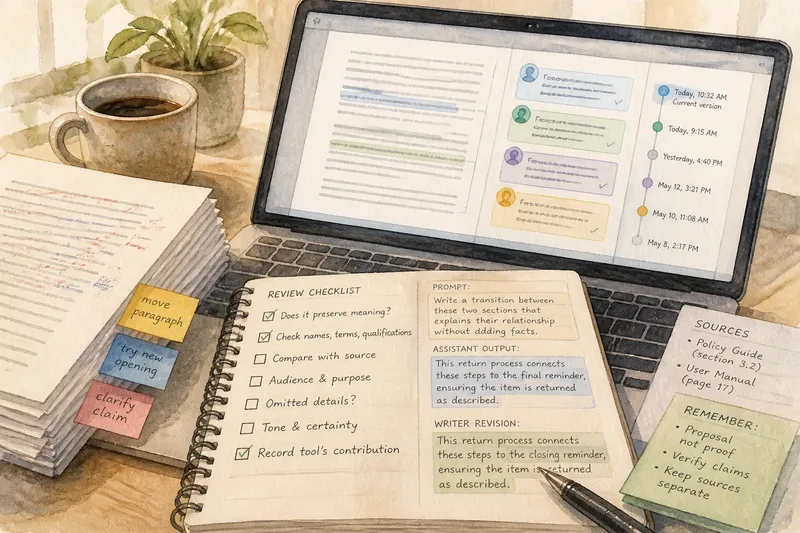
Shared files made comments, suggested edits, and version history part of the writing process. A reader could point to a confusing claim without rewriting it, and a writer could accept, reject, or adapt a proposed change. That made the document both a draft and a record of decisions.
- If a comment identifies a question the draft leaves unanswered, then revise the relevant passage; if it reflects a reader’s preference rather than a problem, then decide whether that preference suits the document’s purpose.
- If a tracked edit preserves the claim and improves clarity, then accept or adapt it; if it changes emphasis or certainty, then reject it or rewrite the passage yourself.
- If several people are editing the same file and an earlier passage may be needed, then use version history to review or restore it; if the earlier wording is no longer useful, then keep the current version.
- If a comment has been resolved by a change in the text, then mark it resolved; if the question remains open, then leave it visible and state what decision is still needed.
- If a shared file’s current version is unclear, then check its version history or ask collaborators which copy is authoritative; if there is a clear current copy, then make further edits there.
- If a suggested change affects a name, technical term, or qualification, then check it against the source material; if it conflicts with that material, then retain or restore the supported wording.
How is generative AI different from a text editor?
A conventional text editor mainly helps you work with words you have entered. A generative assistant can produce new prose, alternatives, summaries, or transformations in response to an instruction and any material you provide. It can therefore shape the draft before you have written a version of your own.
That first output can influence what seems natural to write next. Treat it as a proposal, not as evidence that its claims are sound. Keep source material separate from generated language, then compare the output with the source for omitted qualifications, changed emphasis, and unsupported details.
Imagine you have two sections in a draft about returning a borrowed item, but the transition between them feels abrupt. You provide both sections to an assistant and ask for a transition that explains their relationship without adding facts. It offers a sentence that connects the return instructions to the closing reminder. You compare that sentence with both sections, remove a phrase that implies a deadline not stated in the source, and keep the rest. The resulting transition links the sections without changing the underlying instructions.
How should you check AI-generated writing?
Start by naming the task: correction, alternatives, new prose, or a rewrite. Each task needs a different review. Use this checklist to decide what to do with a proposed change:
- If a correction preserves the intended meaning and fixes a clear error, then accept it; if it changes a name, technical term, or qualification, then check the source before deciding.
- If an alternative fits the audience and purpose, then revise it into the surrounding passage; if it sounds unlike the rest of the draft, then adapt it or write another version.
- If new prose makes a factual claim, then verify the claim against trustworthy source material; if you cannot support it, then remove it or rewrite the sentence to state only what you know.
- If a rewrite preserves the original claim and relevant details, then consider using it; if it changes emphasis, certainty, or tone, then restore those parts or reject the rewrite.
- If a summary leaves out a qualification that matters to the reader, then add the qualification back; if the omitted detail is not needed for the summary’s purpose, then keep the shorter version.
- If generated wording is intended for work with disclosure or attribution rules, then check those rules and record the tool’s contribution; if no such rule applies, then still keep track of what you changed so you can review the draft responsibly.
What questions do writers ask about computer-aided writing?
Did word processing make revision easier?
It made moving and changing text less cumbersome than rebuilding a typed page. The writer still had to judge whether a revision served the reader.
How does generative AI differ from spell-check?
Spell-check flags possible errors in existing text, while a generative assistant can create substantial new language from an instruction. Review generated claims as well as wording.
Does fluent output mean the assistant understands the subject?
No. A polished sentence can omit a condition or introduce an unsupported assertion. Check important content against the source material and the document’s purpose.
Who is responsible for the finished draft?
The person submitting or publishing the work is responsible for its accuracy and choices. Follow any applicable rules for attribution or disclosure, and keep the tool’s contribution distinguishable while revising.
What remains the writer’s responsibility?
Computer-aided writing has moved from helping writers handle text to offering language of its own. Across those changes, the writer decides what the reader needs, which claims have support, and whether a sentence says what it should.
For computer-aided writing, a useful habit is to keep the purpose visible and review each contribution in context. Before accepting a suggestion, ask what changed in meaning, evidence, and emphasis. That question keeps the final draft answerable to a human reader.